Roon, now playing, on any screen.
Track Fly is a small Roon extension that runs on a Mac. It turns what plays in any Roon zone into a JSON feed and an album art page on your network. Put the track on an old iPad by the amp, a tiny OLED on the rack, a touch bar on the desk, or in Home Assistant.
$ curl -s "http://studio.local:8765/now?zone=Listening%20Room"
{
  "source":          "roon",
  "zone":            "Listening Room",
  "state":           "playing",
  "title":           "So What",
  "artist":          "Miles Davis",
  "album":           "Kind of Blue",
  "position":        112.4,
  "duration":        562.0,
  "volume":          38,
  "queue_remaining": 4,
  "artwork_url":     "/artwork?zone=..."
}
Pick a screen.
Roon Remote is great in your hand. These are for the glance from the listening chair: what is this, who plays on it, how long is left.
An old iPad or tablet by the amp
Track Fly serves a full-screen now-playing page at http://your-mac.local:8765/display, with the album cover if you like. Open it on a tablet, a spare phone or a TV browser and leave it there. Nothing to install on the tablet.
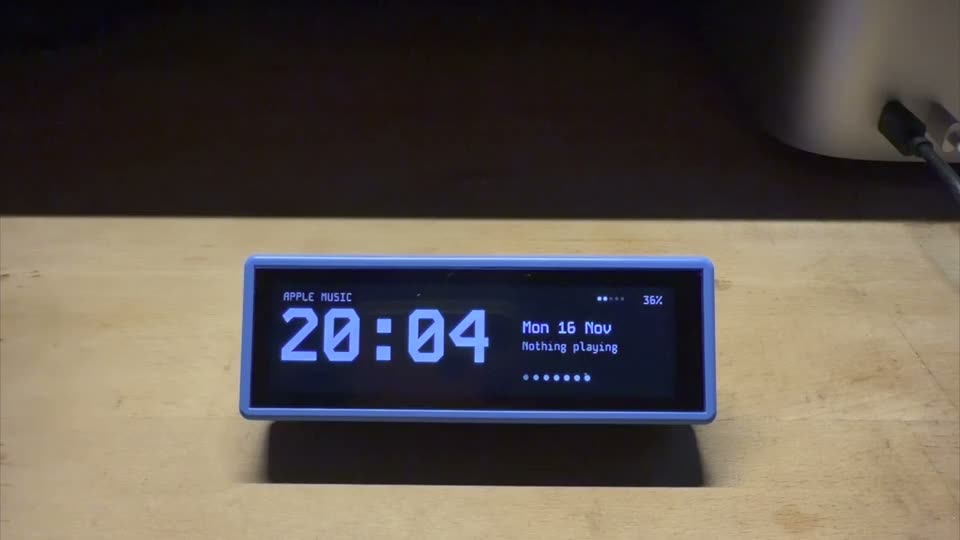
A 640×172 touch bar on the desk
Waveshare ESP32-S3-Touch-LCD-3.49 with a battery. Tap for previous, play/pause, next and volume in the Roon zone it follows. Set up from your phone. Firmware →
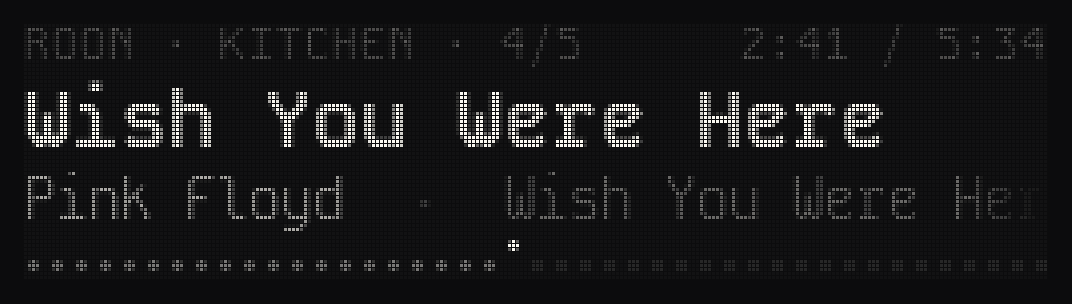
A small OLED that looks at home on a rack
A 256×64 grey-scale OLED, about the size of a front panel display on hi-fi gear. Firmware →
Anything that can read JSON
A REST sensor in Home Assistant can dim the lights when the listening room starts playing. An ESP32 sketch, an OBS overlay or a Python script reads the same feed. Examples →
One zone, or whichever plays.
Roon thinks in zones, and so does Track Fly. Each screen can follow its own room.
Follow a zone
Add ?zone=Kitchen to the feed, or pick the zone on the display's own page. Leave it out and you get whichever zone is playing.
Control it back
/control plays, pauses, skips and sets the volume of that Roon zone, so a display can be a small remote too.
Every zone at once
/zones lists every Roon zone Track Fly sees, so a display can offer them as a menu.
Album art included
artwork_url points to the cover as a 640 px JPEG, served by Track Fly on your network.
Credits stay out of the way
Roon lists performers like "Bill Evans / Instrumental". artist keeps the first name for small screens, and artists has the full list.
Knows when you stopped
A zone paused for longer than you set (5 minutes by default) counts as stopped, so a screen can go back to its clock.
Two minutes to set up.
Track Fly needs a Mac on the same network as your Roon Core. It doesn't have to be the Core itself.
- Download Track Fly and open it. It lives in the menu bar.
- Turn on Roon in Track Fly's Settings. It finds your Core by itself. If it doesn't, type the Core's address under "Roon address".
- Enable the extension in Roon: Settings › Extensions › Track Fly › Enable.
- Pick a zone or leave it on "Whichever is playing", then copy the feed address from the menu bar into your screen.
Questions.
Something missing? Write on the Roon Community forum or open an issue on GitHub.
Is Track Fly free?
Yes. The app and both display firmwares are free. There is no account and no subscription.
Does it need a Mac?
Yes, Track Fly is a macOS app (macOS 15 or later). Your Roon Core can run on another machine, such as a Nucleus, a NAS or a Linux box, as long as it is on the same network.
Does it send my listening anywhere?
No. The feed is served from your Mac to your local network only. The app only contacts trackfly.stream to check for updates.
Can it show more than one zone?
Yes. Each screen follows its own zone, or whichever zone is playing. One Mac running Track Fly serves all of them.
Does it work with Apple Music, Spotify or Plex too?
Yes. The same feed covers Apple Music, Spotify and Plex, with the same fields, so a screen doesn't need to know where the music comes from.